Showing posts with label Cat5. Show all posts

Friday, April 14, 2017

How to Choose Fiber Optics for Mellanox ConnectX Ethernet Adapter Cards?

Mellanox ConnectX Ethernet adapter card provides high-performance networking technologies by utilizing IBTA RoCE technology, delivering efficient RDMA services and scaling in ConnectX-3, 4, 5, 6 EN 10/25/40/50/56/100/200GbE connection. The Mellanox ConnectX EN Ethernet card supports a full suite of software drivers like Microsoft Windows (including Windows 10), Linux distributions, VMware and Citrix XenServer. ConnectX Ethernet adapter card comes in several types for 10/25/40/50/56/100/200GbE network, such as ConnectX-3 EN, ConnectX-3 Pro EN, ConnectX-3 Pro EN 10GBASE-T, ConnectX-4, ConnectX-4 Lx EN, ConnectX-5 EN, ConnectX-6 EN adapter cards. In this article, we present an in-depth network-level performance evaluation of the Mellanox ConnectX Ethernet adapter cards and the supported fiber optic cabling.
Mellanox ConnectX Ethernet Adapter Card
Network Interface Card (NIC), also known as Network Interface Controller, Network Adapter, LAN Adapter or Physical Network Interface. All Mellanox 10/25/40/50/100/200 Gigabit Ethernet adapters deliver high-bandwidth and industry-leading Ethernet connectivity in enterprise data centers, high-performance computing, and embedded environments. From ConnectX-2 to ConnectX-6, Mellanox keep upgrading their Ethernet adapter cards to meet customers requirement.
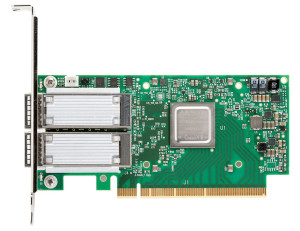
Connectx-6 EN
ConnectX-6 EN—200Gb/s Adapter Card
ConnectX-6 EN 200Gb/s Adapter Card, launched last year, was the world-first 200Gb/s Ethernet network adapter card for Ethernet connectivity, sub-600 ns latency and 200 million messages per second. ConnectX-6 EN, seen in the image, provides two ports of 200Gb/s for Ethernet connectivity. As the first adapter to deliver 200Gb/s throughput, ConnectX-6 is the perfect solution to provide machine learning applications with the levels of performance and scalability that they require.
ConnectX-5 EN—Adapter Supporting 100Gb/s EthernetConnectX-5
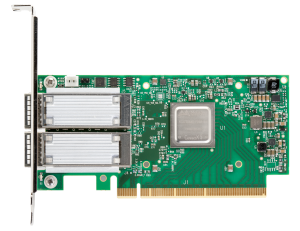
ConnectX-5 just as the image shows, supports two ports of 100Gb/s Ethernet connectivity, sub-700 nanosecond latency, and very high message rate, plus PCIe switch and NVMe over Fabric offloads, providing the highest performance and most flexible solution for the most demanding applications and markets.
Table 1 presents the detailed information about Mellanox ConnectX-5 EN Ethernet Adapter Cards
Ordering Part No.DescriptionSpeedPortsConnectorsDimensions w/o Bracket
MCX515A-CCAT100GbE single-port QSFP28, PCIe3.0 x16, tall bracket, ROHS R6100GbE1QSFP2814.2cm x 6.9cm (Low Profile)
MCX516A-CCAT100GbE dual-port QSFP28, PCIe3.0 x16, tall bracket, ROHS R6100GbE2QSFP2814.2cm x 6.9cm (Low Profile)
MCX516A-CDAT100GbE dual-port QSFP28, PCIe4.0 x16, tall bracket, ROHS R6100GbE2QSFP2814.2cm x 6.9cm (Low Profile)
ConnectX-4 EN—Adapter Supporting 10G/40G/100Gb/s
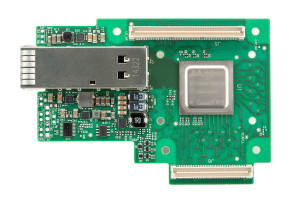
ConnectX-4 LX ENConnectX-4 adapter cards have three different types: ConnectX-4 Lx EN Programmable Adapter Card, ConnectX-4 EN, ConnectX-4 Lx EN. ConnectX-4 Lx EN Programmable Adapter Card is listed in the right image. ConnectX-4 EN network is the single or dual port 100 Gigabit Ethernet adapter cards. ConnectX-4 Lx enables data centers to migrate from 10G to 25G and from 40G to 50G speeds at similar power consumption, cost, and infrastructure needs. If you are into this NIC card, you'd better look through their difference.
ConnectX-3 Pro EN—10/40/56 Gigabit Ethernet Network Interface Cards
ConnectX-3 Gigabit Ethernet interface card is one of the mostly used NIC cards nowadays. This kind of NIC card can support 10/40/56Gb/s Ethernet connectivitConnectX®-3 Pro Programmable Adapter Cardsy with hardware offload engines. The long-term goal at Mellanox ConnectX Gigabit Ethernet adapter card is to allow customers to wire once and switch protocols on the server and switch as required by workloads. Mellanox can presumably charge a premium for such capability, and ConnectX-3 silicon allows Mellanox to create fixed adapters and switches at specific speeds to target specific customer needs and lower price points, too. The image on the right display the ConnectX-3 Pro Programmable Adapter Cards.
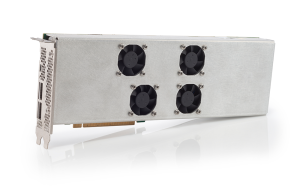
For detailed information about ConnectX-3 Pro EN adapter cards, please see the Table 2.
Ordering Part No.DescriptionDimensions w/o Bracket
ConnectX-3 Pro EN Adapter Cards  
MCX311A-XCATSingle 10GbE SFP+10.2cm x 5.4cm
MCX312A-XCBTDual 10GbE SFP+14.2cm x 6.9cm
MCX313A-BCBTSingle 40/56GbE QSFP14.2cm x 5.2cm
MCX314A-BCBTDual 40/56GbE QSFP14.2cm x 6.9cm
ConnectX-2—Supporting 10G Ethernet Switches
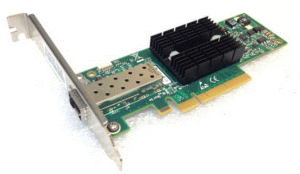
ConnectX-2 Gigabit Ethernet Cards
Mellanox ConnectX-2 EN cards are the older cards for Ethernet only. That means that they will not work in Infiniband networks. In fact, there are still a few examples of OSes without ConnectX-2 support. Prime examples are FreeBSD 9.3 based FreeNAS and NAS4Free versions which did not have built-in support for the cards. The bottom line is that in terms of compatibility, one does need to verify these cards will work.
Many customers do use these in their Windows 10 home workstation for a 10Gb SFP+ back-haul network. Speeds are reliable and excellent. Nowadays, Mellanox does not supply this card, but ebay and Amazon do provide ConnectX-2 cards under $19.
How to Choose the Cables and Optical Modules for ConnectX-3 Ethernet Adapter Cards?
According to Mellanox, ConnectX-3 10G/40G/56G Ethernet adapter cards are interoperable with 10/40 Gb Ethernet switches. Passive copper cables with ESD protection are supported in this NIC card. ConnectX-3 cards can support up to 56Gb/s that can accommodate several fiber cables and optical transceiver types. Take the MCX313A-BCBT as an example, it has single 40GbE QSFP+ port. QSFP+ optical transceivers and DAC cables are feasible in this Ethernet Adapter Card. For the 10G SFP+ to 40G QSFP+ migration, Mellanox QSA (QSFP+ to SFP+) modules are required.
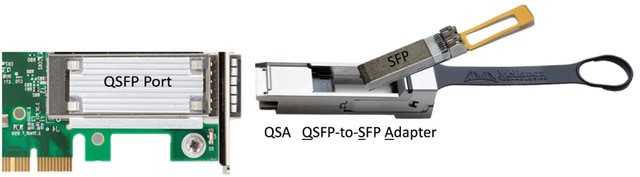
QSA Module
A previous article QSFP+ to SFP+ Adapter (QSA) Module Vs. QSFP+ to SFP+ Breakout Cable provides the detailed information about how to use the QSA module.
DAC Twinax or 10GBASE-T Copper Cable For ConnectX-2 NIC Cards
Mellanox ConnectX EN Gigabit Ethernet Cards can support up to 200Gbps data rate. Each ConnectX adapter card, as mentioned above, supports optical transceivers and modules applied for 10G/25G/40G/100G Ethernet network. ConnectX-2 EN Ethernet card, for example, can be used for 10GbE networks. Except the expensive SFP+ optical transceivers, SFP+ DAC Twinax and 10GBASE-T copper cables are the commonly used  transmission media for 10G data center inter-rack and TOR switching. So how to choose between them?
DAC Twinax Cable
DAC SFP+ Twinax cables integrates SFP+ modules and Twinax cables on the same conduit. It uses the SFP+ optical transceiver modules as connectors (not the real transceiver) on both ends so as to provide a cost-effective and low-power consumption solution for data center interconnection. 10G DAC Twinax cables can be divided into two types: active DAC twinax and passive DAC cables. For distances >5m and <10m, pickup the active version. Otherwise passive direct attach copper cables should be fine.
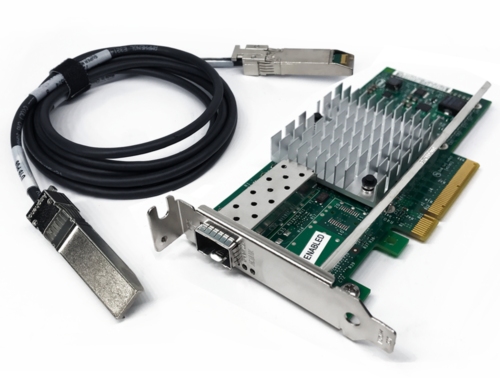
SFP+ DAC Twinax cables in NiC
Fiberstore is one of the best vendors for DAC and other fiber optics. Their packaging and after-sale support for even the smallest orders is excellent. For connecting two ConnectX-2 cards together, you can get one of the SFP+ copper cables.
Ethernet Network Cables
Ethernet Network Cables like Cat5, Cat5e, Cat6 do look alike from the outside and they all use the same connectors as well. However, they have significant differences on the inside. One simple method is that you can find out the type of cable you have by looking at the text printed on the side of the cable. There are other cables possible (like Cat7 and Cat8 cables) but Cat5, Cat5e, Cat6 cables are the most common now.
  • CAT5
Category 5 cabling is an older type of network cabling compared with Cat5e and Cat6 cables. Cat5 cables support transfer speeds of 10/100 Mbit/s (Fast Ethernet). Nowadays, many installers treat it as old and obsolete and try not to use it. For those who buy cat5 cables,  they tend to use in older devices such as an older router or switch.
Category 5 enhanced (Cat5e) cables currently are the most commonly used Ethernet network cables owing to its enhanced transmission data rate and reduced crosstalk. Cat5e cabling supports 1000 Mbit/s and cust down on external and internal crosstalk. It basically means that Cat5e is better at keeping signals on different circuits or channels from interfering with each other.
  • CAT6
Category 6 cabling (Cat6) supports 10 Gbit/s speeds with additional crosstalk improvements. If you're purchasing a new cable for future proofing,  it should really be CAT6 or above. That doesn't imply Cat6 cables protect your network from the future or anything, it just means it will keep it up to date for longer when the next products comes along.
Note : Your network speed depends on  the slowest part of your setup. If you want to deploy gigabit ports, gigabit routers, switches,  then please make sure you cabling also supports those speeds as well.
 
Summary
Mellanox is the world-class vendor for selling multi-protocol chips and adapter cards for servers. It provides a wide range of high-speed interconnection solutions including Gigabit Ethernet cards and InfiniBand adapter cards. The above mentioned ConnectX Gigabit Ethernet cards can not be used in InfiniBand networks. ConnectX Mellanox Gigabit Ethernet cards are the cost-effective devices for your network applications. If you do have the Mellanox NIC cards, you can buy the cost-effective DAC and optical transceiver modules from FS.COM to further reduce the total cost of your budget.

Tuesday, August 23, 2016

Using HDMI Cables for High-Quality Transmission

As audio video systems and installations have become more complex over time, it is common for people to use HD TVs, HD media players, and other home theater systems. Additionally there seemed to be a big variance in quality between brands, especially when it came to extending HDMI signals. Therefore, the introduction of HDMI technology is a game changer and highly appreciated by overall users in this days. Just as fiber jumper connecting optical equipment, HDMI cables offer long-distance HD audio and video signals transmission playing an important role in achieving brilliant performance. Today’s article will have a brief introduction to this cable.
HDMI Cable
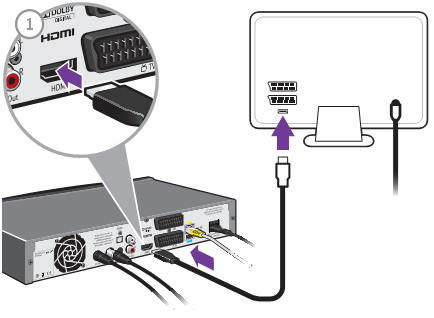
HDMI ((High-Definition Multimedia Interface) cable is composed of four shielded twisted pairs with several separate conductors for transferring data over video/audio devices. A HDMI cables are defined into two cable categories: one is the Category 1-certified cables, known as standard HDMI cables, the other is Category 2-certified cables, also called high speed HDMI cables. HDMI cables has not been specified the transmission length. A cable of about 5 meters (16 feet) can be manufactured to Category 1 specifications easily and inexpensively by using 28 AWG conductors. With better quality construction and materials, including 24 AWG conductors, an HDMI cable can reach lengths of up to 15 meters (49 feet). HDMI cables are expensive than the regular Cat6/Cat7 cables. Just as anything else, whether you want to use the expensive but high-performance HDMI cables or cheap but low-performance Category copper cables like Cat5e/Cat6, it depends on what inputs you tech has. The below part lists the current usage of HDMI cables, and you can look at the solutions that interest you. The following image shows the image of a HDMI cables connecting box and HDMI socket of TV.
HDMI technology
Difference Between an HDMI Cable and a DVI Cable
HDMI cable and DVI cable as two two input-output media interfaces in home network are posing difficulty in distinguishing them. In fact, the biggest difference between these two transmission media lies in their layout. An HDMI cable is more compact and resembles a USB cable, while a DVI cable is usually bigger in size. Another major difference is in capability: the HDMI supports audio and video, whereas the DVI is strictly video-only.
Applications of HDMI Cables
  • Boosted HDMI: HDMI cables, with a booster integrated into their structure use the 5v power rail of the HDMI signal to carry the data further without loss of fidelity. This cable, compared with the normal HDMI cable, is intended to make longer cable runs, but it can also be used to make a short cable thinner and much more flexible. HDMI cables with integrated booster chipsets are more expensive than their basic counterparts, and so far only cater to 1080p content due to the loss of bandwidth over the extended length, but they can reach 40 meters.
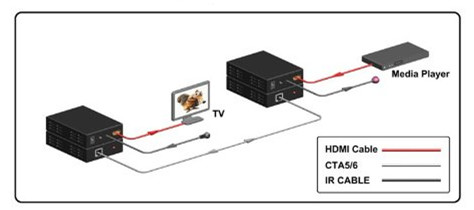
  • HDMI over CAT: It is not a new concept to use Cat5 or Cat6 cables to extend an AV source. HDMI recently make use of this technology for stable extended runs—sometimes even using existing network cabling. Due to bandwidth limitations, most CAT extenders only support 1080p, but some can handle 3D, too. Configuration is more complex than regular cables, and interference can be a big problem in some environments, but with a good HDMI over Cat5/6 Extender, you can run 50 meters.
HDMI over Cat
  • HDMI over Fiber Optics: Fiber optics for HDMI, compared with HDMI over CAT, carries the highest price premium, but they have the much better capacity to outstrip copper based cables for distance by a large margin. The added benefit to this cable type is flexibility with a maximum distance of 45 meters. The optical core is much smaller than Boosted HDMI, but can go the same distances. Note that some companies have kits which run much longer, but it of course will cost far more!
  • HDMI over Wireless: Wireless technologies vary between models, but one thing they have in common is they don't generally go as far as cables do. Line of sight is 10 to 15 meters, and through walls can be as low as 5 to 8 meters. Unless you can't run a cable at all, a lead will beat Wireless every time. Wireless is also limited by bandwidth to 1080p, and only the best units can handle 3D.
Some Terms Appeared in the Above Part
1080p refers to an HDTV format which has 1080 horizontal lines of resolution. The p stands for progressive scan. The traditional analog video uses an interlaced scan, which draws the odd lines, then even lines of each frame in sequence.
AWG is short for American Wire Gauge, which is a common unit of wire measurement. AWG expressed in a HDMI cable refers to the size of the conductors within the cable. With wire gauges, smaller numbers actually refer to larger wires. This means a 24 AWG cable has a thicker conductor than a 28 AWG cable. The benefit of a thicker conductor is the ability to effectively transmit an HD signal.
Plenum refers to the air-handling spaces in building construction above the ceiling and beneath the floors. Some building codes require Plenum-rated cable, which has a low-smoke jacket that burns slower in the event of a fire and emits less toxic smoke.
Summary
This article isn’t a definitive guide to HDMI cables, but for the sake of simplicity we just provide some basic information about industrial and commercial applications of HDMI cables. If you are on the fence to install a fiber optic network, always use the shortest length of cable you can live with, and ensure they're certified by the industry bodies. What’s more, it is advisable for you to save your money for other home network components and get your HDMI cables as cheaply as possible. FS.COM offers a full range of optical products including fiber optic cables (e.g. SC to LC patch cable), copper cables (like Cat5e, Cat6), optical transceivers and so on. If you want to know more information about our products, please send your request to us.

Friday, July 29, 2016

Color Code Standard of Ethernet Cable – T-568B and T-568A

Ethernet cables are the standard cables used for almost all purposes that are often called patch cables or fiber jumper. In an article “How to Choose Ethernet Cable”, we know that Ethernet cables can be categorized into many types, like straight-through and crossover Ethernet cable, UTP or STP, Cat5 or Cat6, etc. But we know little about the pins and wiring in Ethernet cables and RJ45 plugs.
RJ-45 conductor cable contains 4 pairs of wires, each consisting of a solid colored wire and a strip of the same color. There are typically two wiring standards for RJ-45 wiring: T-568A and T-568B. What do they mean, and why they are important? This post will discuss the color diagram of straight-through and crossover Ethernet cable to help you figure out.
Straight-Through and Crossover Cables
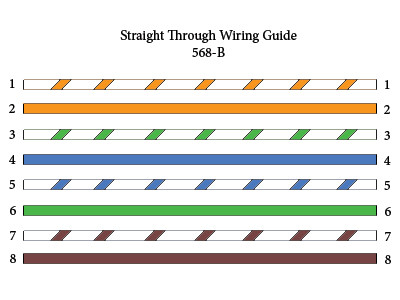
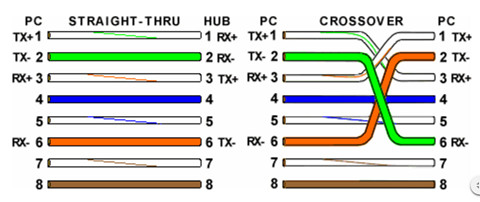
Straight-through refers to the Ethernet cables that have the pin assignments on each end of the cable—Pin 1 connector A goes to Pin 1 on connector B, Pin 2 to Pin 2 etc. Straight-through wired cables see in Figure 1 are most commonly used to connect a host to client. For example, the straight-through wired cat5e patch cable is used to connect computers, printers and other network client devices to the router switch or hub (the host device in this instance).
StraightThrough cable
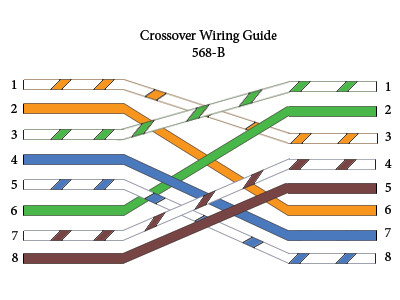
While an crossover cables are similar with straight-through cables, except that TX and RX lines are at opposite positions on either end of the cable, in other words, Pin 1 on connector A goes to Pin 3 on connector B. Pin 2 on connector A goes to Pin 6 on connector B ect. Crossover cables are most commonly used to connect two hosts directly.
Crossover cable
What’s more, the color code diagram of these two cables are different. To create a straight-through cable, you will use either T-568B or T-568A on both ends, while to create a cross-over cable, you will wire T-568A on one end, and T-568B on the other end.
T-568B and T-568A Standard
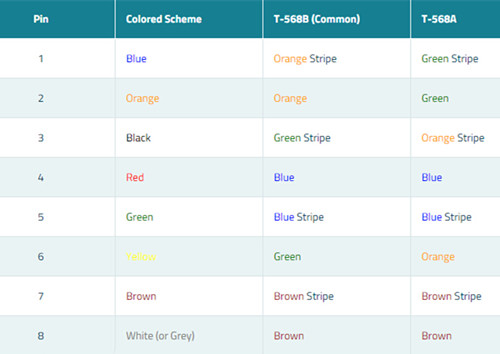
T-568A and T-568B are the two wiring standards for RJ-45 connector data cable specified by TIA/EIA-568A wiring standards document. T-568A standard ratified in 1995, was recently replaced by the T-568B standard in 2002. The difference between the two is the position of the orange and green wire pairs. It is preferable to wire to T-568B standards if there is no pre-existing pattern used within a building.
color code
Both the T-568A and T-568B standard Straight-through cables are used most often as patch cords for your Ethernet connections. If you require a cable to connect two Ethernet devices directly together without a hub or when you connect two hubs together, you will need to use a Crossover cable instead.
crossover and straight-through cable
Looking at a T-568A UTP Ethernet straight-through cable and an Ethernet crossover cable in the above image with a T-568B end, we see that the TX pins are connected to the corresponding RX pins, plus to plus and minus to minus. You can also see that both the blue and brown wire pairs on pins 4, 5, 7, and 8 are not used in either standard. What you may not realize is that, these same pins 4, 5, 7, and 8 are not used or required in 100BASE-TX as well. So why bother using these wires, well for one thing its simply easier to make a connection with all the wires grouped together. Otherwise you’ll be spending time trying to fit those tiny little wires into each of the corresponding holes in the RJ-45 connector.
Conclusion
Ethernet cable color-coded wiring standard allows optical technicians to reliably predict how Ethernet cable is terminated on both ends so they can follow other technicians' work without having to guess or spend time deciphering the function and connections of each wire pair. There is no technical difference between the T568A and T568B wire standard, so neither is superior than the others. FS.COM offers a full range of optical devices including fiber optic cables like LC-SC fiber cable, copper cables (Cat5/5e, Cat6), etc. If you have any requirement of our products, please send your request to us.

Thursday, July 14, 2016

How To Choose Ethernet Cable

Ethernet cable is used to connect devices on local area networks (switch, router or hub), which is one of the most popular forms of fiber jumper cables used on wired networks. Ethernet cables are typically classified into sequentially numbered categories based on different specifications, such as cat5, cat5e, cat6, etc. What are the differences between these category Ethernet cable and how can you know when to use unshielded, shielded, stranded, or solid cable? This article will help you find the suitable one.
Category Ethernet Cable Difference
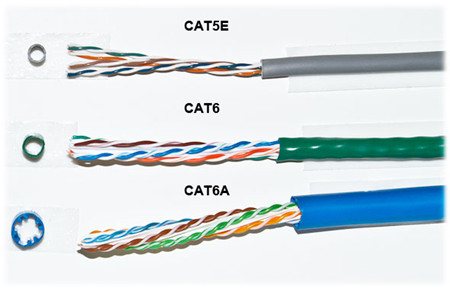
The Cat3, Cat4, Cat5, Cat5e, Cat6, and Cat7 are the abbreviation for the category number that defines the performance of UTP (Unshielded Twisted Pair) type of cable used for Ethernet wiring outlined by the Electronic Industries Association (EIA) standards. The differences in these cable specifications is not easy to identify. However, as the category number gets higher, so does the speed and Mhz of the wire. The following image shows a comparison between Cat5, Cat6 and Cat6 UTP cables.
cat_cables
Besides the speed and hertz, there are two main physical differences between Cat5 and Cat6 cables, the number of twists per cm in the wire, and sheath thickness. It is known that cable twisting length is not standardized, but typically there are 1.5-2 twists per cm in Cat5e and 2+ twists per cm in Cat6. The amount of twists per pair is usually unique for each cable manufacturer. From the above picture, you can see that no two pairs have the same amount of twists per inch. And Cat5e cable has the thinnest sheath, but it also was the only one with the nylon spline. The nylon spline can help eliminate crosstalk, the thicker sheath protects against near end crosstalk (NEXT) and alien crosstalk (AXT) which both occur more often as the frequency (Mhz) increases.
Nowadays Category 5 cable was mostly replaced with Category 5 Enhanced (Cat5e) cable which did not change anything physically in the cable, but instead applied more stringent testing standards for crosstalk. While Category 6 was revised with Augmented Category 6 (Cat6a) which provided testing for 500 Mhz communication (compared to Cat6’s 250 Mhz). The higher communication frequency eliminated alien crosstalk (AXT) which allows for longer range at 10 Gb/s.
Shielded (STP) vs. Unshielded (UTP)
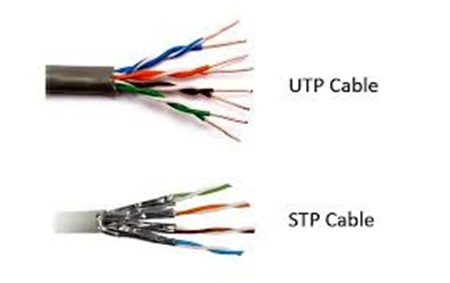
All Ethernet cables are twisted pair, but they are created equally. Telecom vendors rely on shielding to further protect the Ethernet cable from interference, thus the shielded twisted cable (STP) is more suitable for area with high interference and running cables outdoors or inside walls. Unshielded twisted pair however, can easily be used for cables between your computer and the wall. Technically the picture below shows a UTP and STP cables.
UTP or STP
There are different methods to shield an Ethernet cable, but typically it involves putting a shield around each pair of wire in the cable. This protects the pairs from crosstalk internally. Manufactures can further protect cables from alien crosstalk but screening UTP or STP cables.
Solid vs. Stranded
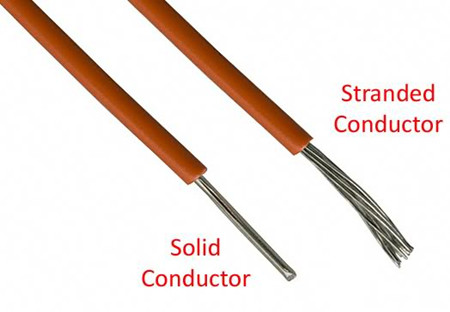
Solid or stranded refer to the actual copper conductor in the pairs. Of an Ethernet cable. Solid conductor uses 1 solid wire per conductor, so in a 4 pair (8 conductor) roll, there would be a total of 8 solid wires. Stranded conductor uses multiple wires wrapped around each other in each conductor, so in a 4 pair (8 conductor) 7 strand roll, there would be a total of 56 wires.
solid or stranded
Each type of conductor (see in the above picture) can be utilized in different applications. Stranded cable is more flexible and should be used at your desk or anywhere you may be moving the cable around often. Solid cable is not as flexible as stranded cable, but more durable which makes it ideal for permanent installations as well as outdoor and in walls. Stranded wire are generally made with patch leads with connectors on the either end like LC to SC patch cord.
Conclusion
Due to the electrical transmission characteristics, a single Ethernet cable like an electric power cord, can extend only limited distances. At the end of the article, you may know when to choose STP, UTP, stranded or solid cables. Note that if you're cabling a mission critical system or you want your network to be future proof, go for the CAT6 cables, but for the average home or small office network CAT5 or CAT5e will be just fine.